Copy/Move (Sale Order)
Copy Sale Order
If user has to copy any existing sale order to create a new sale order then it can be done in Apparel Connect system.
Steps to follow:
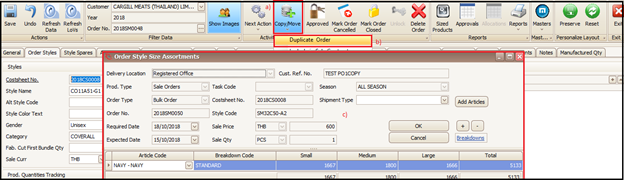
- Click on Copy/Move at the top of screen of sale order
- Click on ‘Duplicate Order’
- A pop-up screen will appear where user can change the existing quantity break up as per the new quantities and click on OK
System will open the main sale order screen with all information copied in respective tabs.
Steps to follow:
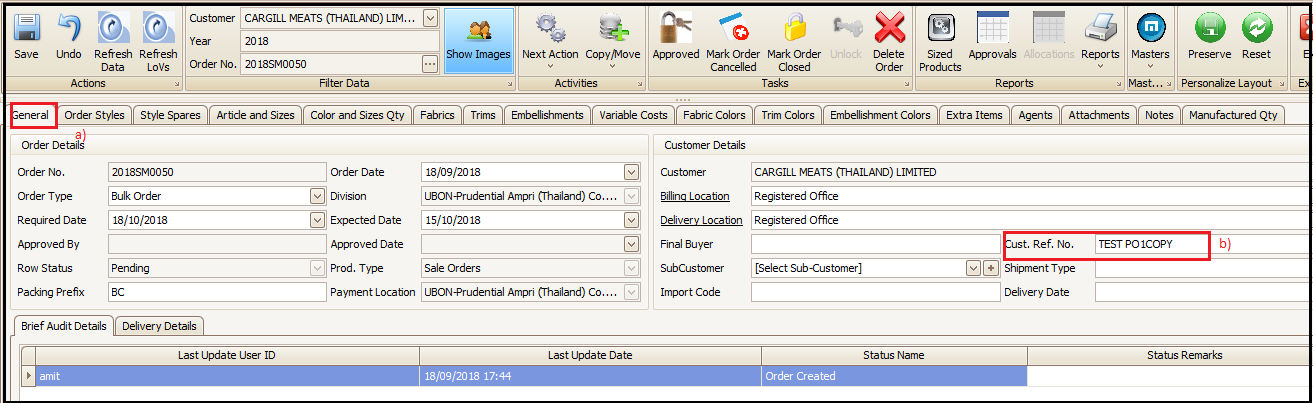
- User will click on ‘General’ tab
- In Customer reference number field user can update the new customer PO number and save
Created with the Personal Edition of HelpNDoc: Write eBooks for the Kindle