How To Create a Misc. Stock Issue
Miscellaneous Issue
When you have to reduce some material stock without issuing it to production or any other authentic entity.
Steps to follow:
- Click on Stock Transactions
- Click Misc. Stock Issues
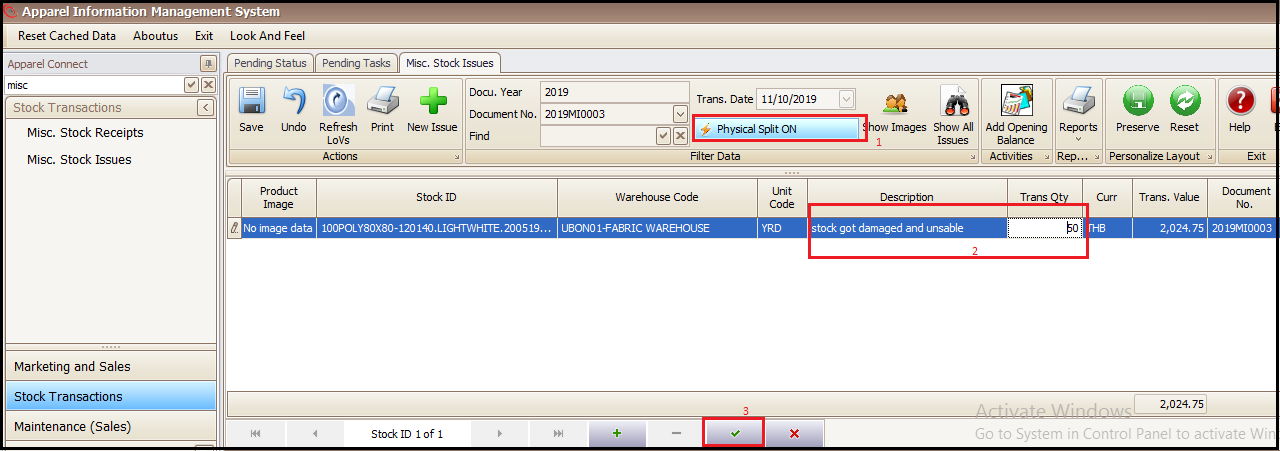
- Click + at bottom in the newly opened tab
- Click on Stock ID link (a new window will open)

- Select the warehouse from which user has to issue the material and particular product can be searched through Find
- Click on Stock ID of desired product which needs to be issued (this will take us on main screen)

- Keep the Physical Split on if you want to issue partial qty
- Enter the reason of Misc. Issue in Description and enter issue qty in Trans Qty
- Save and Exit (issue transaction is complete)
Created with the Personal Edition of HelpNDoc: Write EPub books for the iPad