Reservation from In-Transit Bulk Purchase Order
Reservation from In-Transit Bulk Purchase Order
In case the material quantity is not available as required in stock then user will go for ‘Reserve Bulk PO’. User can check list of bulk POs for that material against which receiving is still pending from ‘Fabric Purchase Orders (Bulk)’/ ‘Fabric Purchase Orders (Bulk)’ menu. This is present in ‘Warehouse and Purchases’ main menu.
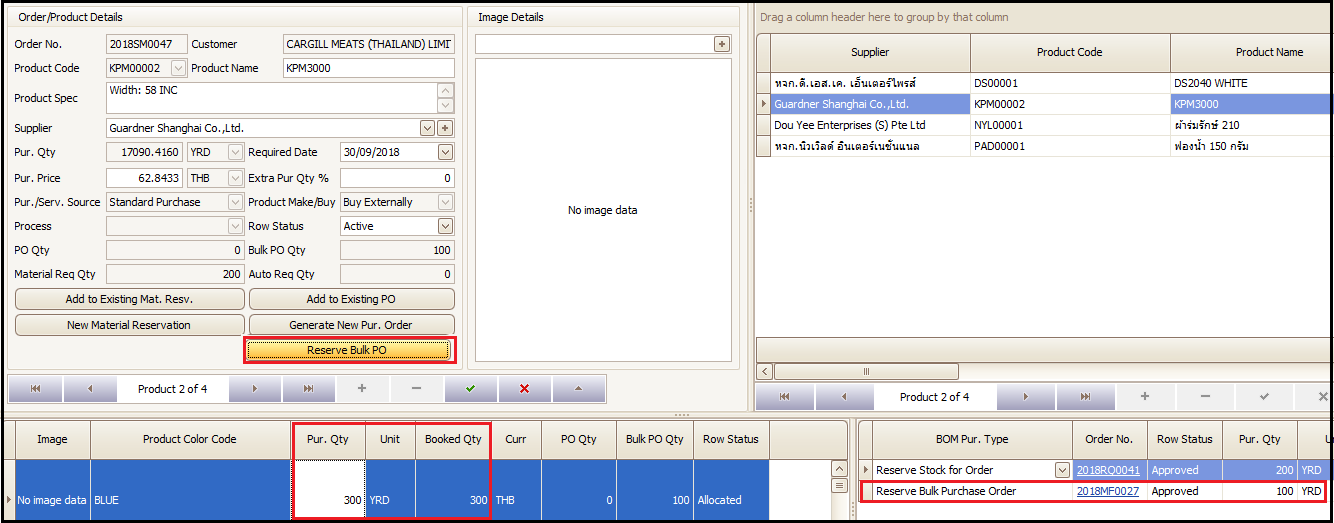
In-case user clicks ‘Reserve Bulk PO’ button then system will automatically reserve the quantity from the bulk PO, if available, which has the earliest material delivery. If bulk PO is not available then nothing will happen on click.
Steps to follow:
- Click on Sale Order BOM
- Select the item for which bulk PO reservation needs to be done and Click on ‘Reserve Bulk PO’
In below screen system has reserved 100 yards from bulk purchase order number 2018MF0027 and the requirement for blue color is fulfilled as highlighted.
Created with the Personal Edition of HelpNDoc: Full-featured EPub generator