How To Create a Material Purchase Order (Bulk/Ad hoc)
Bulk/Ad hoc Purchase Order Creation
Bulk purchase orders are created for stock and are not linked to any sale order/contract. Material received against bulk purchase order remains free available stock in inventory.
Steps to follow:
- Click on ‘Warehouse and Purchases’
- Click on ‘Fabric Purchase Orders (Bulk)’ or ‘Trim Purchase Orders (Bulk)’
- Click on ‘New Purchase Order’ + Button as highlighted in screen.
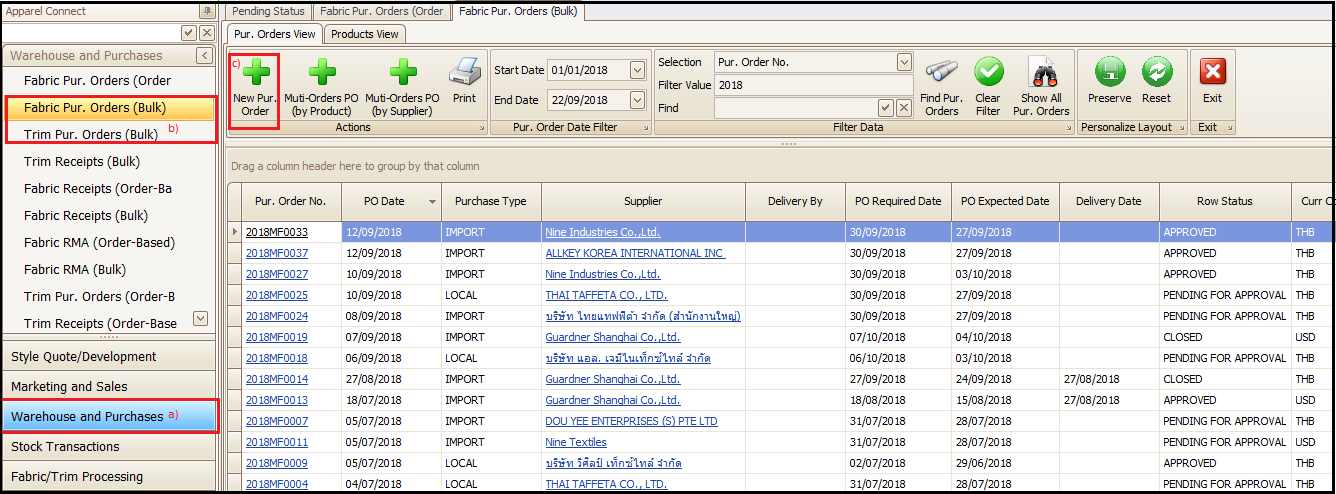
Bulk Purchase Order Creation
- Fill the details in all headers as per requirement (supplier, delivery date, product, product quantity, shipment schedule etc. in respective tabs. The process detail is already explained above for creating new purchase orders)
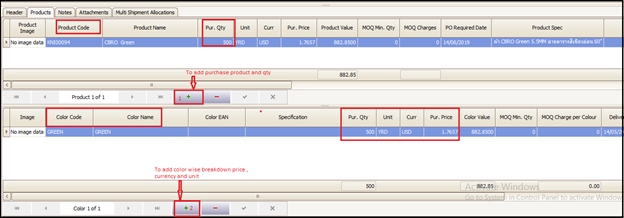
- Click on + (1) and add product , qty and unit
- Click +(2) and add color wise qty of product price, unit and currency etc.
- Rest of the process is same as order based PO explained in Material Purchase Order (Sale Order Based)
Created with the Personal Edition of HelpNDoc: Produce electronic books easily